
Apple MacBooks are widely celebrated for their sleek design, reliability, and powerful performance. However, like any sophisticated piece of technology, they are not entirely immune to hardware failures or data storage problems. Among the most critical components of any laptop is the Solid State Drive or SSD, which holds everything from the operating system to precious personal files and professional projects. When storage complications arise, finding reliable assistance becomes an urgent priority for any user. Choosing top macbook repair and services can make the difference between a minor software fix and a complete loss of invaluable data. Understanding common storage dilemmas, repair procedures, and maintenance habits helps ensure your device remains healthy and operational for years to come.
Common Signs of MacBook Storage and SSD Failure
Recognizing the early indicators of storage degradation can save you from catastrophic data loss. MacBooks generally give subtle or sometimes explicit warnings when their internal drives begin to malfunction. One of the most frequent symptoms is the dreaded flashing folder with a question mark upon startup, which typically signifies that the machine cannot locate a valid operating system on any internal storage volume. Users may also experience sudden application crashes, freezing screens, or extreme sluggishness when opening files or booting up the computer. Another common red flag involves frequent error messages stating that the disk is full, even when minimal files are stored locally, or receiving persistent warnings from macOS Disk Utility indicating that the directory structure is damaged and cannot be repaired through standard software protocols.
Software Diagnostics Versus Hardware Repair Solutions
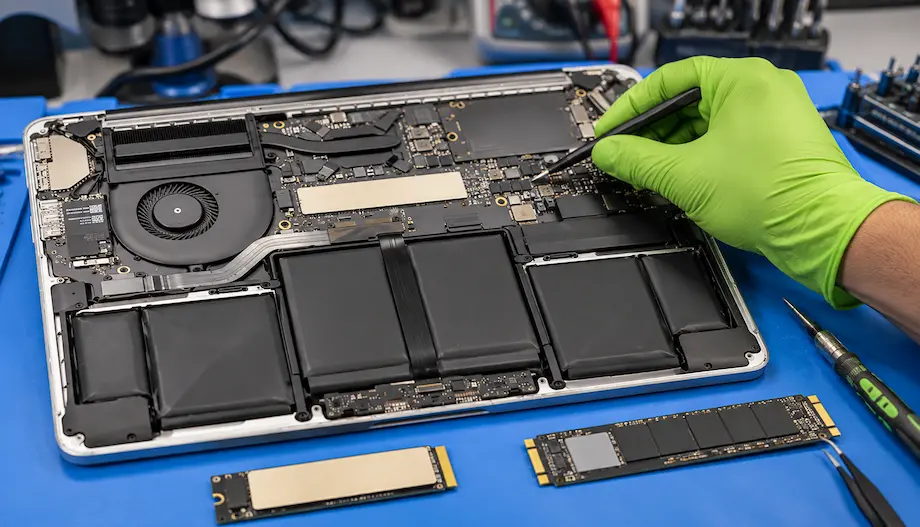
When storage issues strike, a professional technician will first determine whether the problem stems from a software glitch or physical hardware failure. Many minor corruption issues can be resolved using built-in diagnostic tools like Disk Utility and its First Aid feature, which scans the drive directory for logical errors and repairs them. Reinstalling macOS or clearing system caches can also breathe new life into an erratic drive. However, if physical damage has occurred due to age, electrical surges, or liquid contact, software fixes will fall short. In older MacBook models featuring removable SSD modules, technicians can physically swap out the faulty drive for a high-capacity replacement. Conversely, modern Apple Silicon MacBooks integrate storage chips directly onto the logic board, requiring advanced micro-soldering expertise and specialized component-level diagnosis to restore functionality.
The Importance of Professional Expertise and Data Recovery
Attempting DIY repairs on intricate Apple hardware often leads to further damage, particularly given the compact nature of modern internal layouts. Entrusting your device to top macbook repair and services guarantees that certified technicians with specialized diagnostic equipment will handle your machine safely. Professional repair shops utilize cleanroom environments and advanced data recovery tools to extract photos, documents, and databases from drives that appear completely dead. Furthermore, professional services offer transparent evaluations, helping users weigh the cost-effectiveness of repairing an older storage controller versus investing in a brand-new computer. They also ensure that replacement parts meet strict industry standards, preserving the speed, thermal efficiency, and security features native to your Mac.
Proactive Maintenance and Future Storage Strategies
Preventing future storage crises involves a combination of smart digital hygiene and regular data backup routines. Utilizing automated backup solutions like Time Machine alongside cloud storage platforms ensures that a sudden hardware failure never translates into permanent data loss. Users should also monitor their drive capacity regularly, keeping at least ten to fifteen percent of their total storage free to allow macOS adequate breathing room for virtual memory swap files and background maintenance tasks. Avoid abrupt power shutdowns whenever possible, and use a surge protector to shield your laptop from electrical spikes. By combining mindful daily usage with access to top macbook repair and services, you can safeguard your digital workspace and maximize the lifespan of your Apple laptop investment.